New · NOVA Together
Share your life with the people you choose.
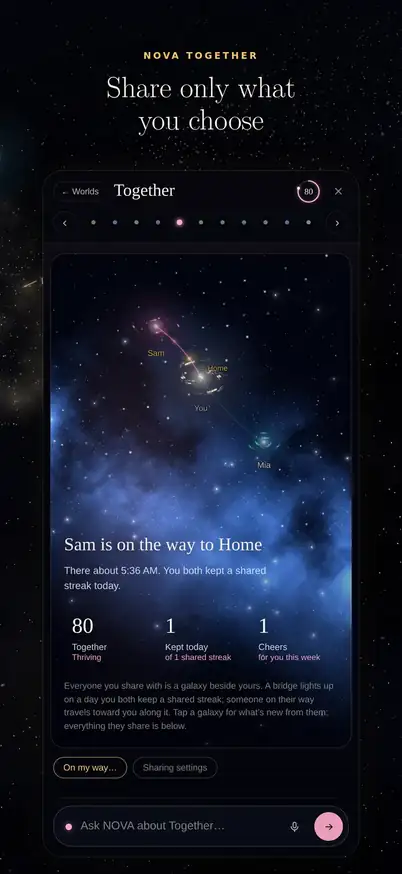
Pick a person, then tap an item to choose how much they see. Guests don’t need NOVA and never pay.
Good evening · meet NOVA Brain
Your email, calendars, money, health and people live in thirty different apps, and none of them talk to each other. NOVA, your AI second brain, holds it all in one mind, notices what’s slipping, and handles it when you say so.
14 days free · no card
Or try it now. Ask NOVA something. This demo runs on a sample life.
Works with the apps you already use
Why NOVA
30apps4inboxes3calendars→1mind
NOVA · Today
Search five apps for what you promised DanaAsk once. NOVA remembers, with the email it came from.
Walk into meetings coldA brief on your phone ten minutes before.
Guess whether you can afford itOne number: what's safe to spend until payday.
See it live
Not a mock-up. These are NOVA’s own screens, running on one real life (we’ll call her Alex): her Oura ring, ten years of Google Timeline, her client pipeline and her birth chart.
Tip: click the menu inside the screen, or jump to a section
New · NOVA Together
Pick a person, then tap an item to choose how much they see. Guests don’t need NOVA and never pay.
On every paid plan
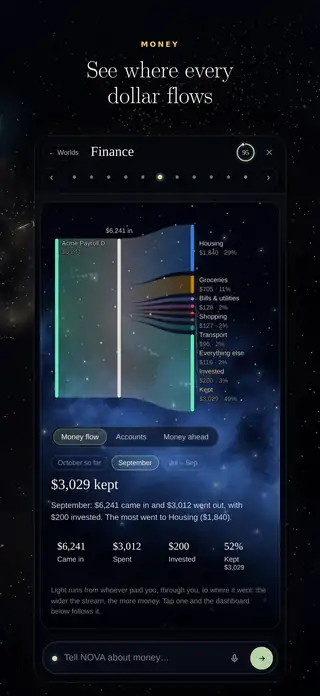
Banks, cards, investments and loans through Plaid, plus your credit health. Read-only: NOVA explains and plans, and never moves money.
Hover a stream to see where it went.
Safe to spend until payday: $640. NOVA warns you before a bill makes it tight.
NOVA for iPhone
All of NOVA on iPhone, plus what only an app can do: reminders that arrive on time even without signal, a live note the moment someone cheers you on or is on their way, and “Share to NOVA” from any app.
Coming to the App StoreIn testing on TestFlight now
Get the iPhone app →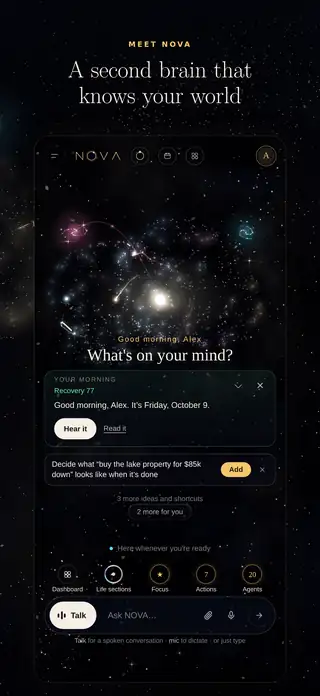
Explore NOVA
Voice, memory, life dashboards, travel and quick capture.
Specialist agents, and you choose what each may do.
How your data is encrypted, walled off and kept yours.
See the roadmap, vote, and request features.
On every device
Connect one account and NOVA starts learning in minutes.
Inside NOVA
Every screen here is NOVA running on one real person’s life. We’ll call her Alex. Pick a section, or click the menu inside the screen, just like you would in the app.
Shared with permission. Names and goals are changed, and work details are made generic.
Features
Most tools wait to be organized. NOVA does the organizing, keeps the evidence, and brings forward only what deserves your attention.
The loop
01 · CAPTURE
Connect accounts, import years of history, or say a thought out loud. Share to NOVA from your phone, save from the browser, or forward an email.
02 · UNDERSTAND
Each fact keeps where it came from, when, and how sure NOVA is. Memories link people, projects and goals, across past, present and future.
03 · ACT
Drafts, schedules, follow-ups and reminders, carried out by specialist agents. Anything consequential waits in one place for your approval.
Capabilities
Just shipped · October 2026
CHAT
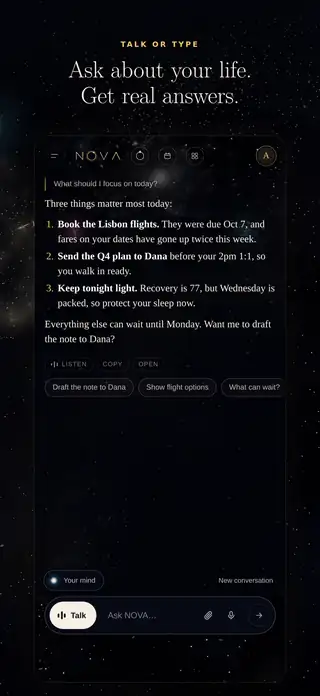
NOVA picks the best AI for each answer from OpenAI, Claude and Gemini. It searches the web and shows its sources, reads spreadsheets and draws charts, and saves email drafts straight into your Gmail or Outlook. Nothing is sent without you.
CHAT
Your words appear in the box as you dictate, and the box grows as you write. Send another message while NOVA is answering and it changes course, the way you’d redirect someone mid-sentence.
VIEW
Want less on screen? Simple view is just the conversation, with everything else in a sidebar. New to NOVA? Show me around lights up each place on the real screen and says what it’s for.
DESKTOP
NOVA in its own window on your computer. On a Mac it can also bring in your texts, WhatsApp and Apple Mail, if you switch them on: one-to-one chats with your contacts, and the last 30 days of each Inbox.
DESKTOP
In the Windows and Mac apps, pick a folder and run Claude Code, Codex or Gemini CLI on your own sign-in or key. Choose Suggest only or Make changes, and watch every step it takes.
TOGETHER
Message someone you share with, keep to-dos either of you can tick, and ask NOVA when you need it. NOVA only knows what you two already share, and nobody sees read receipts.
New · NOVA Together
Invite your partner, family or friends, even if they don’t use NOVA. For each person you pick what they see and how much: a signal, a summary or the detail. Included on every plan, and guest accounts are free.
01 · CHOOSE
Free/busy time, trips, shared lists, goals and wellness, chosen per person and per item. Pause or stop any time. Work data is never shareable.
02 · PLAN
Chat one to one, with to-dos either of you can tick. Shared lists stay in sync, joint goals show both of you, and “On my way” shares a journey for a set time, then stops. Guests can add your shared calendar to Google or Apple Calendar and share theirs back.
03 · CHEER
Pick a habit with someone. The flame grows on days you both show up, and a cheer is one tap away. Nobody’s numbers are ranked.
Roadmap
See what just shipped and what's coming, vote for what matters to you, and ask for what's missing.
AI Team
Specialist agents for your inbox, calendar, money, health, career and business, organized like a company and reporting to a chief of staff. You set how much they may do alone.
How approvals look
Send a thank-you and the proposal to Dana at Lumen Health?
Nothing leaves without this tap. Every action keeps a receipt.
Agents draft and prepare. You approve each send, post or change.
Turn on autonomy per agent, with spending caps and a full report.
When you first sign in, NOVA suggests the agents that fit your life: the sections you keep, your business and what you connected. You keep the ones you want, up to your plan’s number.
Quick checks run on fast models and weighing up your week gets the strongest reasoning, from OpenAI, Claude or Gemini. On Plus and Pro, writing goes to a model chosen for writing.
Agents read, draft and suggest. Anything that sends, posts or changes something waits for your tap, unless you allow one specific action.
Permission levels
Set each agent to read, suggest or act with your approval. The fourth level stays locked for everyone.
Level 1
Calendar, mail, files, tasks and health data, so NOVA can understand.
Level 2
Drafts, proposed times, follow-ups and plans, ready for a tap.
Level 3
Sends, schedules, posts and updates records only after you approve.
Level 4
Moving money, signing contracts, deleting data, changing security.
The roster
Tap an agent to see what it watches, what it does on its own and what it always asks you about. Or describe a new one in plain words and NOVA builds it. The business team (a Chief of Staff with Sales, Support, Inbox, Finance, Research, Marketing and more) comes with Pro. Running more than one business? Each gets its own team, with one Chief of Staff leading them all.
Make your own
Say what it should watch and what it should do. NOVA picks the sources, the schedule and what needs your OK. To change an agent later, tell it in words what to do differently.
Privacy & Security
What NOVA can see, what it keeps, and how every piece of it is protected. Nothing is sold, and nothing is used to train AI.
At a glance
| Area | What NOVA can see | What it keeps | What it can do |
|---|---|---|---|
| Messages in the accounts you connect | Memories with a link back to the email | Draft replies. Send only with your OK. | |
| Calendar | Events across every connected calendar | Patterns and meeting context | Propose times. Add events with your OK. |
| Money | Balances, transactions, investments and loans you link through Plaid | Spending patterns, bills and a daily net-worth snapshot | Explain and plan. Read-only: it never moves money. |
| Health | Sleep, recovery and activity you link | Daily scores and trends | Shape your plan around your energy. |
| Phone (Android) | Notifications, places and messages you allow | Meaningful moments; skips codes and promos | Remind you and capture by voice. |
| iPhone app | What you share to NOVA, and where to send your reminders | Nothing from texts, calls or places (iPhone doesn’t allow it) | Remind you on time, notify you live, save from any app. |
| NOVA for Mac | One-to-one texts and WhatsApp chats with your contacts, and Apple Mail’s Inbox for the last 30 days, each only if you switch it on | Texts and WhatsApp: who and when, and the words only if you choose. Apple Mail: who it’s from, the subject and Mail’s own short summary. Work email keeps who and when only. | Keep Relationships current. It never sends a text or an email. |
| NOVA · Code (desktop apps) | Only the folder you pick, on your computer | Nothing, unless you tap Save to NOVA | Suggest only reads and proposes. Make changes edits files in that folder only. |
| NOVA Together | Only what each person chooses to share with you, at the level they pick | Nothing: shared items are live views, never copied into your memory. A Together chat stays between the two of you. | Plan around what's shared. It never reaches into another person's accounts. |
Connecting an account
When you connect Gmail or a calendar, that service gives NOVA a limited key so it can read for you. NOVA never sees your password, and you can take the key back at any time, in NOVA or in your Google account.
Connecting never lets NOVA send, pay or delete on its own. Those wait for your OK, or are never allowed.
Read the full security details →Your history lives in your own durable store, separate from any AI model. Models can change. Your memory stays yours.
Connect two Google accounts or three. Personal, business and work identities stay labeled and walled off.
Sensitive memories stay closed until you open them. Keys stay on the server. Sign out everywhere in one tap.
Questions
No. Conversation is how you use it, but NOVA keeps a lasting memory, connects to your accounts, tracks goals and tasks, and runs agents that prepare and carry out work. It brings things to you before you ask.
Google (Gmail, Calendar, Drive, Tasks), Microsoft (Outlook, Hotmail and Microsoft 365), Yahoo, iCloud and AOL mail, CRMs like HubSpot, payments like Stripe, wearables like WHOOP and Oura, LinkedIn, GitHub and more through a searchable connection library. You can connect several accounts from the same provider, and request new ones.
No. Finance in NOVA is information only: what is coming, what is safe to spend, what is changing. Moving money and signing anything are permanently off-limits to agents.
Only you, unless you choose to share. Every person who signs in gets their own private memory, and no user can reach another's. Detailed memories stay hidden on the main screen until you open them. With NOVA Together you can share chosen items, like free/busy time or a trip, with people you invite, and pause or stop at any time. Work data is never shareable.
NOVA's privacy policy covers what NOVA collects, how it is used and protected, sharing through NOVA Together, the phone apps and your rights. Read the privacy policy or the terms of service. Questions about your data go to privacy@yournovabrain.com.
Write to whichever fits and it reaches a real person. Questions and sign-ups: hello@yournovabrain.com. Help with the app: support@yournovabrain.com. Payments and plans: billing@yournovabrain.com. Your data and privacy: privacy@yournovabrain.com.
Yes. NOVA for iPhone is coming to the App Store (testers have it now through TestFlight), with reminders on your lock screen, live notifications from NOVA Together and “Share to NOVA” from any app. There is an Android app with voice and “Hey NOVA”, and the web app works on any phone.
Yes, in the iPhone app, including with “Hide My Email”. If your Apple ID uses the same email as your Google sign-in, you land in the same NOVA. If you delete your account, NOVA also disconnects itself from your Apple ID.
About NOVA
NOVA began as a personal system: one place to hold the email, calendars, money, health and people a busy life runs on. It’s built with care, because it holds real lives.
A note from the founder
Why I’m building NOVA, in under two minutes. Every screen is NOVA itself, and the voice is mine.
Why you can trust it
Anything that sends, books or changes something waits for your OK, and names the exact account it will use.
What happened, from which account, to whom, and what comes next. Kept so you can check it any time.
Your history lives in your own store, separate from any AI model. Models can change. Your memory doesn’t leave with them.
NOVA explains and plans with your accounts. Moving money and signing anything are never possible.
Who makes NOVA
NOVA is a product of The Transformation Room. Write to us and a real person answers: hello@yournovabrain.com
Get started
Your memory, conversations and connections are the same everywhere you sign in. Start on your phone, pick up on your computer.
For this device
NOVA in ten seconds
Email, calendars, money, docs, to-dos and the people in your life flow into one mind.
It books the meeting, ticks off the to-do and sends the reply. Nothing goes out until you approve it.
No more thirty apps to check. Ask NOVA, and it already knows.
An illustration of how NOVA works
How it works
1Connect
Sign in with Google, then add more accounts, even two from the same provider. Each one stays labeled.
2Remember
Import years of history. NOVA turns it into memories with sources and sorts them into the areas of your life.
3Act
Talk or type. NOVA answers, plans, and drafts. Anything that sends or changes something waits for your OK.
Needs your OK
Gmail · Business → Dana
Proposal v3.pdf attached
ApproveEditEvery device
NOVA in its own window, with a taskbar icon and a Start menu entry. It keeps itself up to date, and it’s where NOVA · Code runs on a PC.
Open NOVA-Setup once it has downloaded: it installs in a few seconds, and your browser opens for Google sign-in, then hands you back.
NOVA for Mac opens NOVA in its own window, runs NOVA · Code, and can bring in your texts, WhatsApp and Apple Mail when you switch them on. It never sends anything.
macOS 13 or newer. Rather not download? Open NOVA in Chrome and choose Install, or in Safari choose File › Add to Dock.
The full NOVA app: talk hands-free with “Hey NOVA”, your notifications and health, and Share to NOVA from any app.
The first time, Android asks to let your browser install apps. Allow it once; updates install over the old version.
Google Play · coming soonTry the NOVA iPhone app now with Apple’s TestFlight: tap the link, install TestFlight if it asks, then install NOVA.
Prefer not to? Open NOVA in Safari, tap Share, then Add to Home Screen.
App Store · coming soonEverything NOVA does, on any computer. Sign in with Google and you’re in.
Already using NOVA? Customize › More settings › This device has the same downloads, with a QR code to send one to your phone. New here? Start your 14-day free trial first, then sign in on any device.
See it in 2 minutes
NOVA’s real brain, filling up as one life connects to it. Every screen is NOVA itself.
Pricing
Every plan starts with a 14-day free trial with Plus features. Video calls (beyond your free setup call) and bank connections start with a paid plan. No card needed to start.
Every plan includes a free 15-minute setup. On a call with NOVA any time, or with a real person if you’d rather.
Payments open soon. Start your trial today and choose a plan before it ends.
Essential
For anyone who wants one assistant that remembers everything.
$19/ month
Billed monthly
Plus Most people
For busy people juggling work, family, money and goals.
$39/ month
Billed monthly
Pro
For founders and solo businesses who want an AI team on the work.
$79/ month
Billed monthly
What it replaces
Each of these tools knows one slice of your life. NOVA connects your email, calendar, money, goals and people, so the answer to one question can come from all of them.
Keep about $75 a month, roughly $900 a year.
Monthly list prices of popular paid apps in each category, from their own pricing pages, October 2026. Prices change, and some apps do more than the job listed here; NOVA covers the part most people pay them for.
And everything around them
The apps are only part of what you pay for. NOVA also replaces the time, the add-ons and the do-it-yourself AI setups people build to hold it all together.
Your time
No connecting a chatbot to a notes app to an automation tool, and no fixing it when one of them changes. NOVA connects your accounts in a few taps and keeps them working.
AI add-ons
Chat assistants, meeting and email add-ons, automation and agent builders. NOVA’s AI team is included, and you can describe a new agent in plain words.
A second brain
No tagging and filing. NOVA turns your email, chats and history into memories with sources, and finds them by meaning.
Family
NOVA Together shares calendars, lists, trips and “On my way” with the people you choose. Family and friends join as free guests.
Make it yours
Why NOVA
AI chat apps are great at answering questions. NOVA is built to live alongside your life: one memory of everything you connect, and help that arrives before you ask.
| NOVA | AI chat appsPopular AI assistants | Build your ownNotes app, automations, API keys | |
|---|---|---|---|
| One memory of your whole lifeEmail, calendars, money, health and people, read together | Yes | Partly | You build it |
| Personal and work accounts, side by sideConnect two Google accounts or three. Every action names which one | Yes | Usually one | You build it |
| Acts for you, and asks firstDrafts, books and follows up, with a receipt for every action | Yes | Partly | You build it |
| Comes to you firstA morning brief, reminders on your phone, a heads-up when something slips | Yes | Partly | You build it |
| Your memory outlives the AI modelSwitch models and nothing you taught it is lost | Yes | No | Yes |
| The best AI for each jobOpenAI, Claude or Gemini, chosen for you | Yes | One company | By hand |
| Shared with the people you chooseCalendars, lists and trips with family, who join free | Yes | No | No |
| Ready in minutesNo servers, API keys or upkeep | Yes | Yes | No |
Partly means some of it, on some plans, inside that one app. Compared with the most popular AI chat apps as of October 2026. Their features change, and so do ours. Names belong to their owners.
Wondering about connecting your accounts? See how NOVA keeps them safe →
Not sure which plan fits? See NOVA for founders or for busy parents.
After your trial · NOVA Free
NOVA Free isn’t a way to start. It’s where your account goes if your 14-day trial ends and you haven’t picked a plan. Your memory and history are kept, but NOVA does much less until you upgrade.
Still there
Paused
$0after your trial
Start with the full trial →Your AI use, at a glance
Adds $8 of AI use to this month, for the months you lean on NOVA hard.
Already pay OpenAI? NOVA's thinking runs on your key, so it stops counting against your plan.
One subscription covers the web, Windows, Mac, Android and iPhone. NOVA for iPhone is coming to the App Store. Get the apps
Loyalty pricing
Most subscriptions creep up. NOVA comes down the longer you stay, taken off every bill automatically. Cancel and come back within 30 days and you keep it. For plans paid through our website.
If you added a card, the plan you picked starts that day and nothing else changes. We email you 3 days before, and you can cancel any time before then. If you skipped the card, choose a plan whenever you like, or you move to NOVA Free: your memory and history are kept, but you're limited to 20 messages a day, a weekly read-out, one connected account and one agent.
Every plan includes a monthly amount of AI work: replies, agent checks, voice and pictures. Essential covers an everyday month, Plus about 2½ times that and Pro about 5 times. Settings › Your AI use shows the share of your plan you've used, week by week, and warns you before you run low. If you run out, top up or wait for next month. Your data and everything already there stays.
For most people, yes for the jobs listed above: asking questions, planning your week, keeping notes, watching your money and handling email. If you rely on a specialist feature of one tool, keep it. NOVA works alongside it.
Any time, from Settings › Plan & billing › Change or cancel. Switch plan or billing period (what you already paid for is credited), pause for 1, 2 or 3 months, move to NOVA Free, or cancel. Pausing, NOVA Free and cancelling start when the time you paid for runs out, and nothing you added is deleted. Every change gets a confirmation email. On Android, Play Store subscriptions are managed in Google Play. Billing questions go to billing@yournovabrain.com.
Yes, in the NOVA app on your phone. About a week before a yearly plan renews, it notifies you with the plan, the date and the price, and how to change or cancel it.
Your accounts connect with their own secure sign-in, and NOVA never sends, posts or changes anything without your OK. See how privacy works.
Subscribe & sign up
Start with 14 days of everything in Plus, free. NOVA works on the web, Windows, Mac and Android today, and the iPhone app is open to try through Apple’s TestFlight.
For founders and solo business owners. NOVA keeps one memory of your clients, inbox, calendar and money, and gives you an AI team that answers leads, drafts posts and chases invoices. Nothing goes out without your OK.
14 days free · no card
This is what a day looks like when your business has a team behind it. Every draft waits for you, and every action names the account it uses.
Your agents report to it first. Only what needs you reaches you, in order.
NOVAToday3 things need you
Who’s joining, what you last said to each other, and what you promised them.
CalendarBusiness10:00 kickoff
Sales drafts a warm reply with your booking link and adds the lead to your pipeline.
GmailBusiness → new leadwaits for your OK
Marketing drafts it and the Graphic Designer makes the visual in your brand colors.
LinkedIndraftposts when you tap
Finance spots it and drafts the reminder. You send it with one tap.
GmailBusiness → clientwaits for your OK
$79 a monthor $65 a month, billed yearly
Nothing is sent, booked or changed without your OK, and every action leaves a receipt. Your data is never sold or used to train AI. How NOVA keeps it safe →
Busy parents hold a hundred small things in their heads. NOVA remembers them, shares the right ones with the people you choose, and nudges you before anything slips.
14 days free · no card
Nothing here needs a new habit. You talk to NOVA the way you’d talk to a friend who never forgets.
Today’s pickups, the one thing that matters, and how you slept if you wear a ring or watch.
Morning briefabout 90 seconds
NOVA notices it in your email and suggests the to-do. It goes on your list when you tap.
GmailPersonal → your listwith your OK
One number: what’s safe to spend until payday, after the bills already on the way.
Financeread-only
Live traffic, from where you are or from home. If the roads get worse, the nudge comes earlier.
PhoneLeave by 3:2515 min drive
Share “On my way” with your partner for the drive home, and tick the shared grocery list together.
NOVA Togetherends when you arrive
$39 a monthor $32 a month, billed yearly
Nothing is sent, booked or changed without your OK, and every action leaves a receipt. Your data is never sold or used to train AI. How NOVA keeps it safe →
NOVA remembers what you said, sent and promised, tells you before something slips, and gets it done when you say so. Talk to it in Arabic or English.
14 days free · no card
Your work email and calendar, your family and your own rhythm, in one mind that asks before it acts.
Your meetings, the one thing that matters, and what NOVA already moved for you. In your language.
Morning briefArabic or English
Who’s joining, what you last said to each other, and what you owe them. Outlook calendars work too.
Outlook calendarWork10:00 review
If you turn on Faith, NOVA spots the clash and suggests the next clear time. It never says why.
Faithoptionaloff until you turn it on
Share the school run, a trip and the shopping list with your spouse or parents. They join free.
NOVA Togetherguests free
Add a PDF statement from your bank. NOVA reads it, dirhams and Arabic digits included, and gives you one number: safe to spend until payday.
Statementread-onlynever stored
An optional section, off until you turn it on. It plans your day around prayer without telling anyone why.
For where you are, including when you travel.
Suhoor and iftar times, quieter nudges around iftar, and a private fasts tracker.
Following Umm al-Qura, with a one-day setting for local moon sighting.
$39 a monthor $32 a month, billed yearly
Nothing is sent, booked or changed without your OK, and every action leaves a receipt. Your data is never sold or used to train AI. How NOVA keeps it safe →